
Blog
How to Choose the Right Microsoft Office Version (Complete 2026 Guide)

Choosing the right Microsoft Office version can be difficult because Microsoft offers several editions for different users, devices, and budgets. Whether you need Office for personal use, education, professional work, or business, understanding the available options will help you select the right license.
In this guide, you will compare Microsoft 365, Office 2024, Office 2021, and older editions. As a result, you can identify which Microsoft Office version offers the applications, payment model, and features that match your needs.
Understanding Microsoft Office Version Licensing Options
Before choosing a product, you should understand how Microsoft Office licenses work. Currently, the main options are subscription-based plans and one-time-purchase editions. Therefore, your preferred payment method is one of the first factors to consider.
A subscription provides ongoing access to supported applications and services. In contrast, a one-time purchase gives you a specific desktop release without a recurring monthly or annual payment.
Microsoft 365 Subscription
Microsoft 365 is a subscription service that provides access to Office applications and cloud-based features. Additionally, eligible plans include OneDrive storage, continuous feature improvements, and support for multiple devices.
Because the subscription remains active only while payments continue, users must renew it monthly or annually. However, subscribers receive newer features as they become available rather than waiting for a separate Office release.
Key Benefits of Microsoft 365
- Access to current Microsoft Office applications
- Continuous feature and security updates
- OneDrive cloud storage with eligible plans
- Support for multiple devices depending on the plan
- Online collaboration and file-sharing tools
- Compatibility with supported Windows, macOS, and mobile devices
Who Should Choose Microsoft 365?
Microsoft 365 is especially useful for customers who work across several devices. For example, students can access documents from home and university, while business users can collaborate on shared files from different locations.
- Students and university users
- Remote workers
- Professionals using multiple devices
- Families that need Office on several devices
- Businesses that require cloud collaboration
Office 2024 One-Time Purchase
Alternatively, Office 2024 is designed for customers who prefer a one-time purchase. Instead of paying a recurring subscription fee, you buy a specific edition and use the included desktop applications according to its license terms.
Office 2024 does not normally receive the same continuous feature additions as Microsoft 365. Nevertheless, it can remain a practical choice for users who need familiar desktop applications and do not rely on advanced cloud services.
Key Benefits of Office 2024
- One-time payment
- No monthly or annual subscription fee
- Classic desktop Office applications
- Suitable for long-term use on the licensed device
- Simple choice for users who do not need cloud services
Who Should Choose Office 2024?
This Microsoft Office version is suitable for customers who mainly work on one computer. In particular, it may be ideal for home users, independent professionals, and small businesses that prefer predictable software costs.
- Home users
- Small offices
- Independent professionals
- Users working mainly on one computer
- Customers who prefer a permanent desktop release
Microsoft 365 vs. Office 2024 Comparison
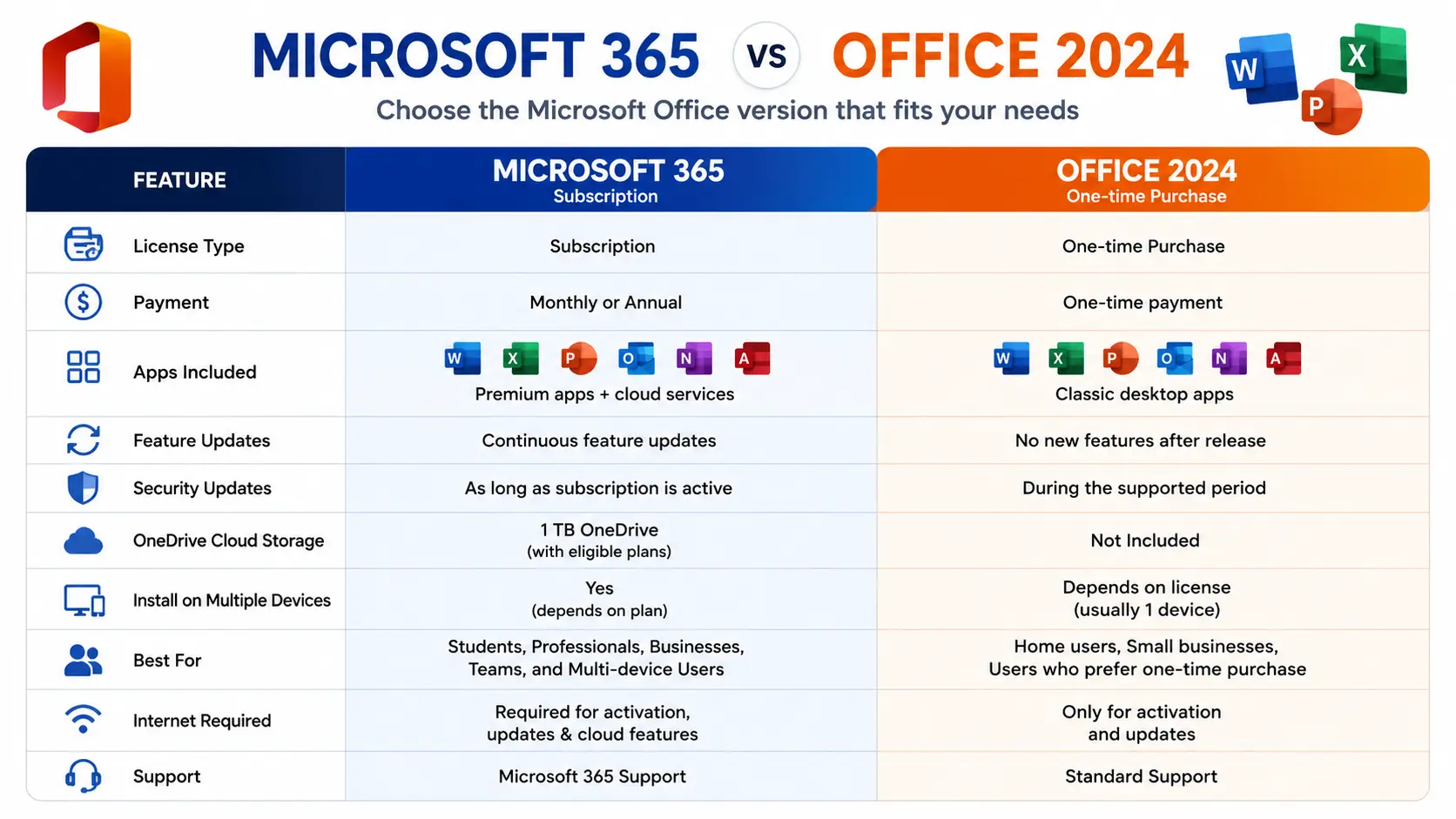
Comparing each Microsoft Office version side by side makes the decision easier. The table below highlights the main differences between Microsoft 365 and Office 2024.
| Feature | Microsoft 365 | Office 2024 |
|---|---|---|
| Payment Model | Monthly or annual subscription | One-time purchase |
| Feature Updates | Continuous feature updates | No major new features after release |
| Security Updates | Available while the subscription is active | Available during the supported product period |
| Cloud Storage | Included with eligible plans | Not normally included |
| Multiple Devices | Supported depending on the selected plan | Depends on the exact license |
| Windows and Mac | Available depending on the plan | Depends on the purchased edition |
| Best For | Cloud productivity, flexibility, and collaboration | Long-term desktop use without recurring fees |
Which Microsoft Office Version Should You Choose?
The best option depends on how you work, which applications you need, and how many devices you use. Therefore, consider your daily workflow before comparing prices.
Best Microsoft Office Version for Students
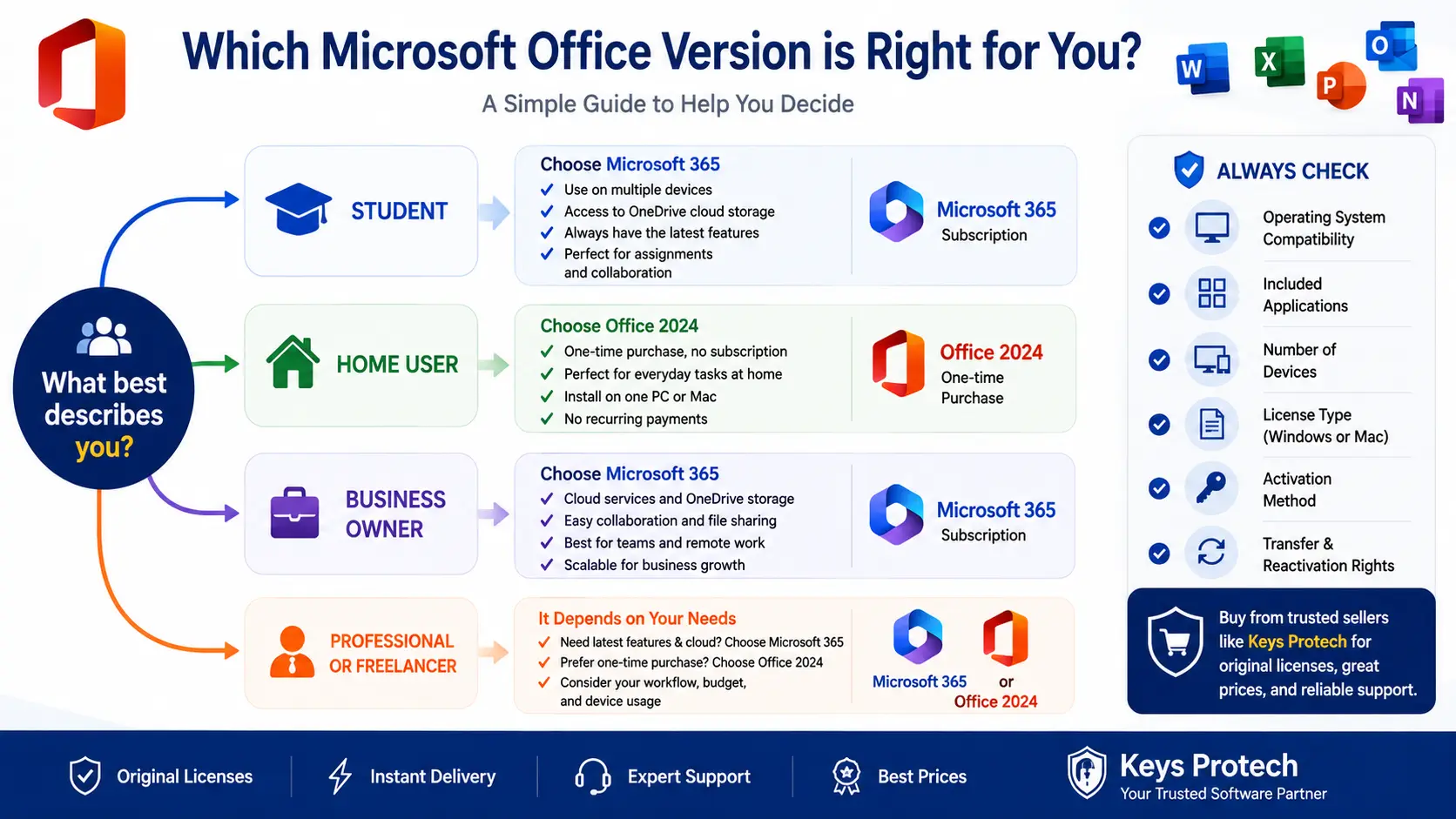
Students often use Word, Excel, PowerPoint, and cloud storage for assignments, reports, and group projects. For this reason, Microsoft 365 may be a practical choice because it combines Office applications with online file access.
On the other hand, a student who uses one computer and does not need cloud services may prefer Office 2024. This option avoids recurring subscription payments and provides the essential desktop applications included with the selected edition.
Best Microsoft Office Version for Home Users
Home users generally rely on Office for documents, personal budgets, presentations, and spreadsheets. Consequently, Office 2024 can provide strong value for customers who prefer a one-time purchase.
Families with several computers may benefit more from Microsoft 365. In addition, eligible subscription plans can provide cloud storage and access across supported devices.
Best Microsoft Office Version for Small Businesses
Small businesses often need shared files, remote access, email management, and collaboration tools. Therefore, Microsoft 365 is usually the more flexible choice for teams working from different locations.
In contrast, a company that only needs locally installed Office applications may prefer Office 2024 or another one-time-purchase edition. Before ordering, however, the business should confirm which applications and device rights are included.
Best Microsoft Office Version for Professionals
Professionals may depend on advanced Excel features, Outlook, Access, Word, and PowerPoint. Before purchasing, review the product description carefully because not every edition contains the same applications.
Furthermore, consider whether continuous updates are important to your work. Microsoft 365 is better suited to users who want ongoing feature improvements, while Office 2024 may suit professionals who prefer a fixed desktop release.
What About Office 2021 and Office 2019?
Office 2021 remains an available option for customers who prefer a one-time purchase. However, it is an older Microsoft Office version than Office 2024 and does not provide the continuous feature updates associated with Microsoft 365.
Office 2019 is older still. As a result, customers buying a new license should carefully review its compatibility, applications, and remaining support conditions before placing an order.
Nevertheless, an older edition may still be useful for a specific computer, operating system, or software environment. Therefore, the newest version is not automatically the right choice for every device.
Microsoft Office Version Recommendations by User Type
Choose Microsoft 365 If You:
- Want current features and updates
- Use Office on multiple devices
- Need OneDrive cloud storage
- Collaborate with colleagues or classmates
- Work remotely
- Prefer a subscription model
Choose Office 2024 If You:
- Prefer a one-time payment
- Mainly work on one computer
- Do not need advanced cloud services
- Want traditional desktop applications
- Prefer to avoid annual renewals
- Need a fixed Office release
Important Factors Before Buying a Microsoft Office Version
Choosing a product based only on price can lead to activation or compatibility problems. Instead, review the following factors before completing your purchase.
Operating System Compatibility
First, confirm that the selected edition supports your operating system. Some Office products are intended only for Windows, while others are designed specifically for macOS.
In addition, check the minimum system requirements. An older computer may not support a newer Microsoft Office version even when the device still works well for basic tasks.
Included Applications
Next, review the list of applications included with the product. Some editions may contain Word, Excel, and PowerPoint, whereas other packages may also include Outlook, Access, Publisher, or additional services.
For example, customers who need professional email management should confirm that Outlook is included. Similarly, users working with desktop databases should verify whether Access is part of the selected edition.
Number of Supported Devices
Additionally, confirm how many devices the license supports. Certain products are licensed for one device, while some Microsoft 365 plans allow use across several supported devices.
Therefore, never assume that one license can be installed on every computer you own. The exact device allowance should be clearly stated on the product page.
Windows or Mac License
A Windows license should not automatically be treated as a Mac license. Instead, customers should select an Office product that specifically lists compatibility with their operating system.
Likewise, Mac users should check the supported macOS release before purchasing an older Office edition. This step is especially important for newer Apple devices.
Microsoft Account Linking
Another important factor is whether the license links to a Microsoft account. Account-linked products may offer a different activation and reinstallation process than licenses activated directly on a device.
Consequently, customers should review the activation method before buying. The product description should explain whether a Microsoft account is required.
Transfer and Reactivation Rights
Finally, confirm whether the license can be transferred or reactivated after a hardware change. Transfer rights depend on the exact product and license conditions.
For this reason, customers planning to replace their computer should select a license that clearly supports their expected usage. When in doubt, contact the seller before completing the purchase.
Common Mistakes When Choosing Microsoft Office
Buying a Windows License for a Mac
One common mistake is purchasing a Windows-only product for a Mac computer. Although the product names may appear similar, the installers and license conditions can be different.
Assuming Every Edition Includes Outlook
Not every Office package includes Outlook. Therefore, customers who need email and calendar management should verify the included applications before ordering.
Ignoring the Device Limit
Some buyers expect one Office key to activate several computers. However, the number of supported devices varies by product, edition, and license type.
Choosing Only by Price
A cheaper product is not always the best value. Instead, compare compatibility, included applications, device support, activation method, and transfer conditions.
Confusing a Subscription with a One-Time Purchase
Microsoft 365 normally requires an active subscription, whereas Office 2024 is generally sold as a one-time purchase. Consequently, customers should understand the renewal requirements before selecting either option.
Why Buy Microsoft Office from Keys Protech?
Choosing a reliable software provider is as important as selecting the right Microsoft Office version. At Keys Protech, customers can review clear product details before placing an order.
Moreover, product information can help buyers understand the supported operating system, included applications, number of devices, activation method, and license conditions.
- Original digital software licenses
- Fast digital delivery
- Clear activation instructions
- Competitive prices
- Technical support during activation
- Customer service before and after purchase
Additionally, customers should read the complete product description before ordering. This simple step reduces the risk of selecting an incompatible Office edition.
Official Microsoft Office Resources
For additional product information, system requirements, and official support, you can also visit the following Microsoft resources:
Frequently Asked Questions About Microsoft Office Versions
Which Microsoft Office version is best?
The best option depends on your usage. Generally, Microsoft 365 is suitable for customers who want cloud services, current features, and support across multiple devices. In contrast, Office 2024 is more appropriate for users who prefer a one-time purchase.
Can I use Microsoft Office without an internet connection?
Yes. After installation and activation, many desktop Office applications can work without a continuous internet connection. However, internet access may still be required for activation, updates, subscription verification, and cloud services.
Is Office 2024 a lifetime license?
Office 2024 is generally sold as a perpetual release rather than a recurring subscription. Nevertheless, usage remains subject to the specific product, supported device, and license terms.
Can I transfer my Office license to another computer?
Transfer rights depend on the exact license type. Therefore, review the product description and activation conditions before making your purchase.
Does Microsoft Office work on Windows 11?
Modern Office editions are designed for supported Windows systems. However, customers should always verify the system requirements listed for the exact Microsoft Office version they intend to purchase.
Can I install a Windows Office license on a Mac?
Normally, a Windows-only license is not intended for macOS. Instead, Mac users should purchase an edition that clearly states compatibility with macOS.
Does every Office edition include Outlook?
No. The included applications vary between editions. As a result, customers who require Outlook should confirm that it appears in the product description.
Is Microsoft 365 better than Office 2024?
Neither option is automatically better for everyone. Microsoft 365 offers subscription benefits, cloud services, and continuous updates, while Office 2024 provides a one-time-purchase alternative for desktop use.
Final Thoughts on Choosing a Microsoft Office Version
Selecting the correct Microsoft Office version does not need to be complicated. First, decide whether you prefer a recurring subscription or a one-time purchase.
After that, confirm the applications you need, the supported operating system, the number of devices, and the activation method. You should also review the transfer and reactivation conditions before completing your order.
Overall, Microsoft 365 is a strong choice for cloud services, collaboration, multiple devices, and continuous updates. Meanwhile, Office 2024 is a practical alternative for customers who prefer desktop applications without recurring fees.
Ultimately, the best Microsoft Office version depends on your workflow, budget, and preferred features. Explore the available Microsoft Office products at Keys Protech and choose the license that matches your requirements.